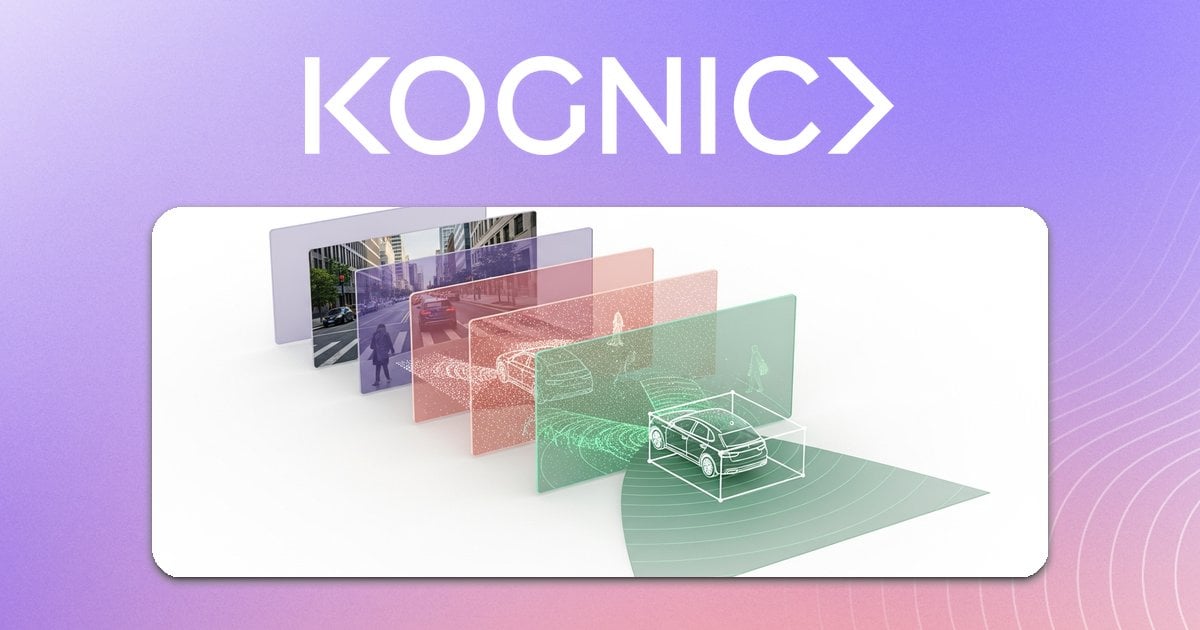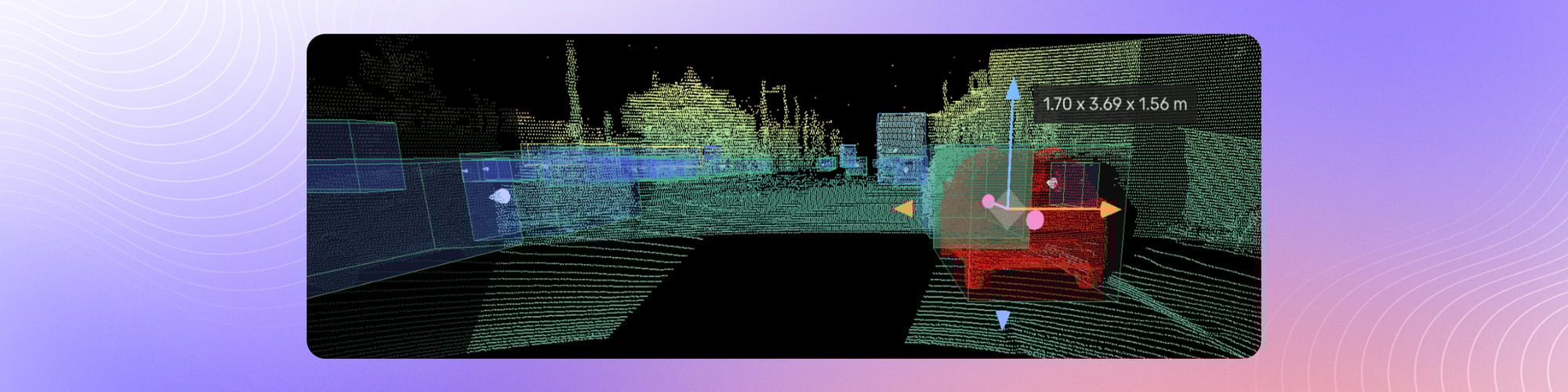
LiDAR (Light Detection and Ranging) has become essential for autonomous vehicles, robotics, and advanced driver assistance systems. Unlike cameras that capture 2D images, LiDAR sensors emit laser pulses to create precise 3D representations of the environment—point clouds containing millions of data points that map the world in three dimensions.
But raw point cloud data is meaningless to a machine learning model. Before an autonomous vehicle can understand that a cluster of points represents a pedestrian crossing the street, that data must be annotated—labeled with information that teaches the model what it's seeing.
This guide covers everything you need to know about annotating LiDAR data: from understanding point cloud structures to implementing quality control workflows that produce training data your models can trust.
LiDAR annotation is the process of labeling objects, surfaces, and boundaries in LiDAR-generated point cloud data to create training datasets for machine learning models. Annotation types range from 3D bounding boxes around individual objects to point-level semantic segmentation, and the resulting labeled data teaches autonomous vehicles and robots to interpret their physical surroundings.
Key Takeaways
- LiDAR annotation transforms raw point cloud data into labeled training datasets that teach autonomous vehicles to detect and classify objects in 3D space.
- The four main LiDAR annotation types are 3D bounding boxes (cuboids), semantic segmentation, 3D polylines, and instance segmentation, each suited to different model requirements.
- Annotating LiDAR data takes 6 to 10 times longer than 2D image annotation, making pre-labeling and model-assisted tools critical for scaling production.
- Sensor fusion, combining LiDAR with synchronized camera and radar views, significantly improves annotation accuracy, especially for object classification and handling occlusion.
- A multi-stage quality control process with automated validation checks, annotator calibration, and expert review is essential for maintaining consistency across large datasets.
What is point cloud data and how does it work?
A point cloud is a collection of data points in 3D space, where each point represents a surface that reflected the LiDAR's laser pulse. Each point typically contains:
- X, Y, Z coordinates — the point's position in 3D space
- Intensity — how strongly the surface reflected the laser
- Return number — for multi-return LiDAR systems
- Timestamp — when the point was captured
Point Cloud Characteristics
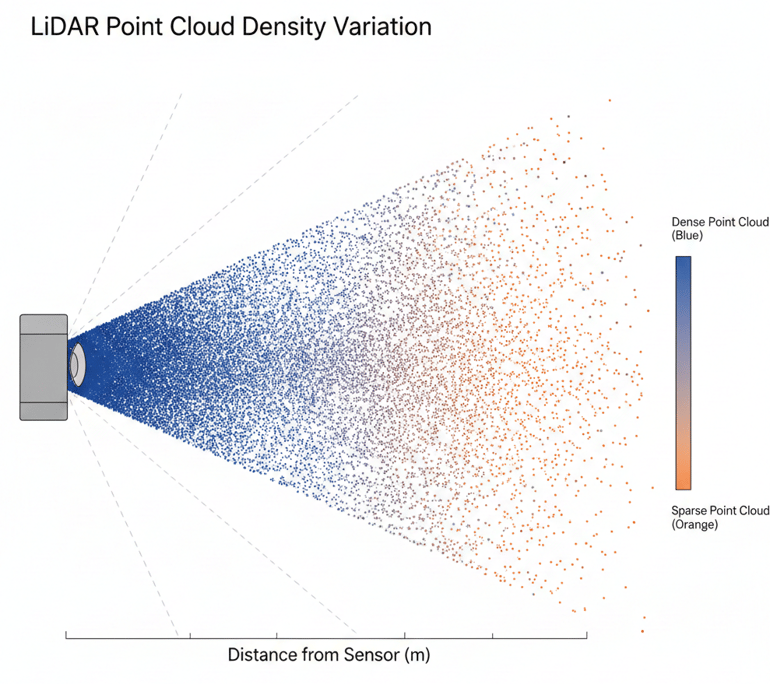
Density variation: Points are denser near the sensor and sparser at distance. An object 10 meters away might be represented by thousands of points; the same object at 100 meters might have only a handful. This creates challenges for consistent annotation, especially for distant objects.
Sparse representation: Unlike camera images where every pixel contains information, point clouds have gaps. A car's windshield might not return any points because glass doesn't reflect LiDAR well. Annotators must infer object boundaries from incomplete data.
Temporal sequences: Autonomous vehicle datasets typically capture point clouds at 10-20 Hz. Objects move between frames, requiring annotators to track them consistently across time—a process that's both more complex and more valuable than single-frame annotation.
What are the main LiDAR annotation types?
3D Bounding Boxes (Cuboids)
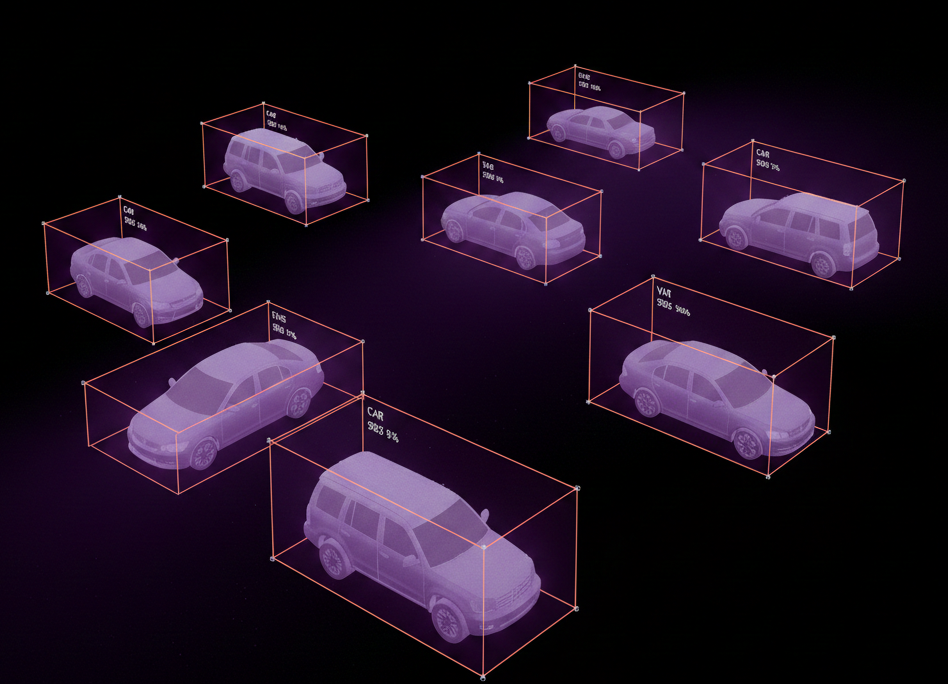
The most common LiDAR annotation type. A 3D bounding box is a cuboid that tightly encloses an object, defined by:
- Position (x, y, z center point)
- Dimensions (length, width, height)
- Orientation (rotation, typically around the vertical axis)
- Object class (vehicle, pedestrian, cyclist, etc.)
- Track ID (for linking the same object across frames)
Best practices for 3D bounding boxes:
- Fit tightly but completely — the box should contain all points belonging to the object without excessive empty space
- Align with object orientation — the box's heading should match the object's direction of travel
- Maintain consistency across frames — object dimensions shouldn't jump erratically between consecutive frames
- Handle occlusion deliberately — when objects are partially hidden, annotate based on the visible points while maintaining reasonable size estimates
Semantic Segmentation
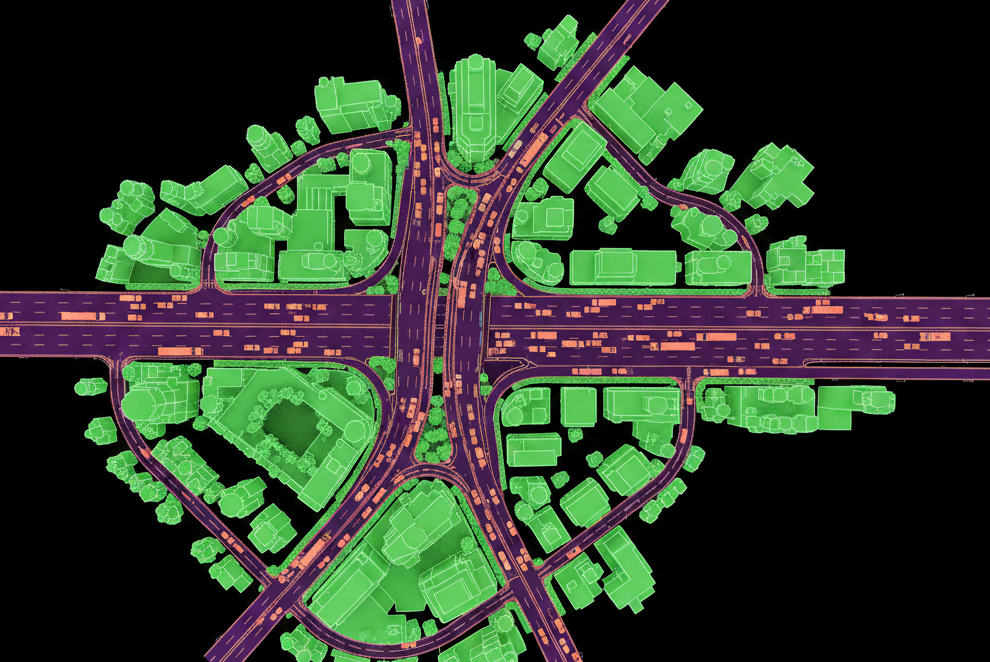
Point-by-point classification where every point in the cloud receives a label (road, sidewalk, vegetation, building, vehicle, etc.). This produces dense scene understanding but requires significantly more annotation effort.
Best practices for semantic segmentation:
- Define clear class boundaries — establish rules for ambiguous cases (Is a curb "road" or "sidewalk"?)
- Handle transition zones — points at the boundary between classes need consistent treatment
- Consider class hierarchies — some projects use nested labels (vehicle → car → sedan)
3D Polylines
Used for lane markings, road boundaries, and other linear features. Polylines define paths through 3D space using connected vertices.
Instance Segmentation
Combines semantic segmentation with instance identification—not just "these points are vehicles" but "these points are Vehicle #1, those are Vehicle #2."
What does a LiDAR annotation workflow look like?
Step 1: Data Preparation
Before annotation begins:
- Calibrate sensors — ensure LiDAR and camera data align correctly if using sensor fusion
- Validate data quality — check for corrupt frames, sensor malfunctions, or calibration drift
- Define the ontology — establish exactly what classes exist and how edge cases should be handled
- Create annotation guidelines — document rules with visual examples
Step 2: Initial Annotation
Annotators work through scenes, creating labels according to the guidelines. For efficiency:
- Use pre-annotations — if you have existing ML models, use their predictions as starting points for human refinement
- Leverage sensor fusion — displaying camera imagery alongside point clouds helps annotators understand ambiguous objects
- Work in world coordinates — annotating in a fixed reference frame (rather than sensor-relative) simplifies tracking objects across frames
Step 3: Quality Review
Every annotation should be reviewed. Common approaches:
- Consensus annotation — multiple annotators label the same data; disagreements are resolved
- Expert review — senior annotators check a sample of work
- Automated validation — software checks for impossible geometries, missing labels, or inconsistencies
Step 4: Iteration
Annotation guidelines evolve. When edge cases arise or model performance reveals labeling issues, update the guidelines and potentially re-annotate affected data.

How do you ensure quality in LiDAR annotation?
In safety-critical applications like autonomous driving, annotation errors can cascade into model failures. Quality isn't optional.
Multi-Stage QA
Don't rely on a single check. Effective QA pipelines include:
- Automated checkers — software validation for geometric consistency, temporal smoothness, and guideline compliance
- Peer review — another annotator reviews the work
- Expert audit — domain specialists sample-check for subtle errors
Automated Validation
Software can catch many errors humans miss:
- Geometric checks — Is a bounding box floating in mid-air? Is it underground?
- Temporal consistency — Did an object's size change dramatically between frames?
- Relationship validation — Is a "pedestrian" label inside a "vehicle" label?
- Completeness checks — Are there unlabeled point clusters that should have annotations?
Kognic's platform includes 90+ automated checkers that identify annotation issues in real-time.
Annotator Calibration
Different annotators interpret guidelines differently. Regular calibration exercises—where annotators label the same data and compare results—identify systematic differences before they contaminate your dataset.
Metrics That Matter
Track quality indicators:
- Inter-annotator agreement — how consistently do different people label the same data?
- Review rejection rate — what percentage of annotations fail QA?
- Error type distribution — are mistakes random, or do patterns suggest guideline gaps?
What are the most common LiDAR annotation challenges?
Challenge 1: Distant Objects
At range, objects appear as sparse point clusters. A vehicle at 200 meters might be just 5-10 points.
Solutions:
- Use camera data for visual context
- Establish minimum point thresholds for annotation
- Train annotators specifically on long-range scenarios
- Accept higher uncertainty in distant annotations
Challenge 2: Occlusion
Objects hidden behind others have incomplete point returns.
Solutions:
- Annotate visible portions with flags indicating occlusion
- Use temporal context—the object was fully visible in previous frames
- Define clear rules for how to size partially-visible objects
Challenge 3: Annotation Speed
Point cloud annotation takes 6-10× longer than 2D image annotation due to 3D spatial complexity.
Solutions:
- Invest in purpose-built 3D annotation tools (not adapted 2D tools)
- Use interpolation—annotate keyframes and let software fill intermediate frames
- Leverage pre-annotations from existing models
- One-click tools that auto-fit cuboids to point clusters
Teams using optimized tooling have achieved up to 68% faster annotation times.
Challenge 4: Class Ambiguity
Is that a pedestrian or a traffic cone? A motorcycle or a bicycle with a rider?
Solutions:
- Create detailed guidelines with visual examples for ambiguous cases
- Establish escalation paths for genuinely unclear objects
- Use confidence flags when annotators are uncertain
Challenge 5: Scale
Autonomous vehicle programs generate massive data volumes. Manual annotation doesn't scale linearly.
Solutions:
- Active learning—prioritize annotating data the model finds confusing
- Auto-labeling pipelines with human verification
- Efficient tooling that maximizes annotations per hour
Why combine LiDAR with camera and radar data?
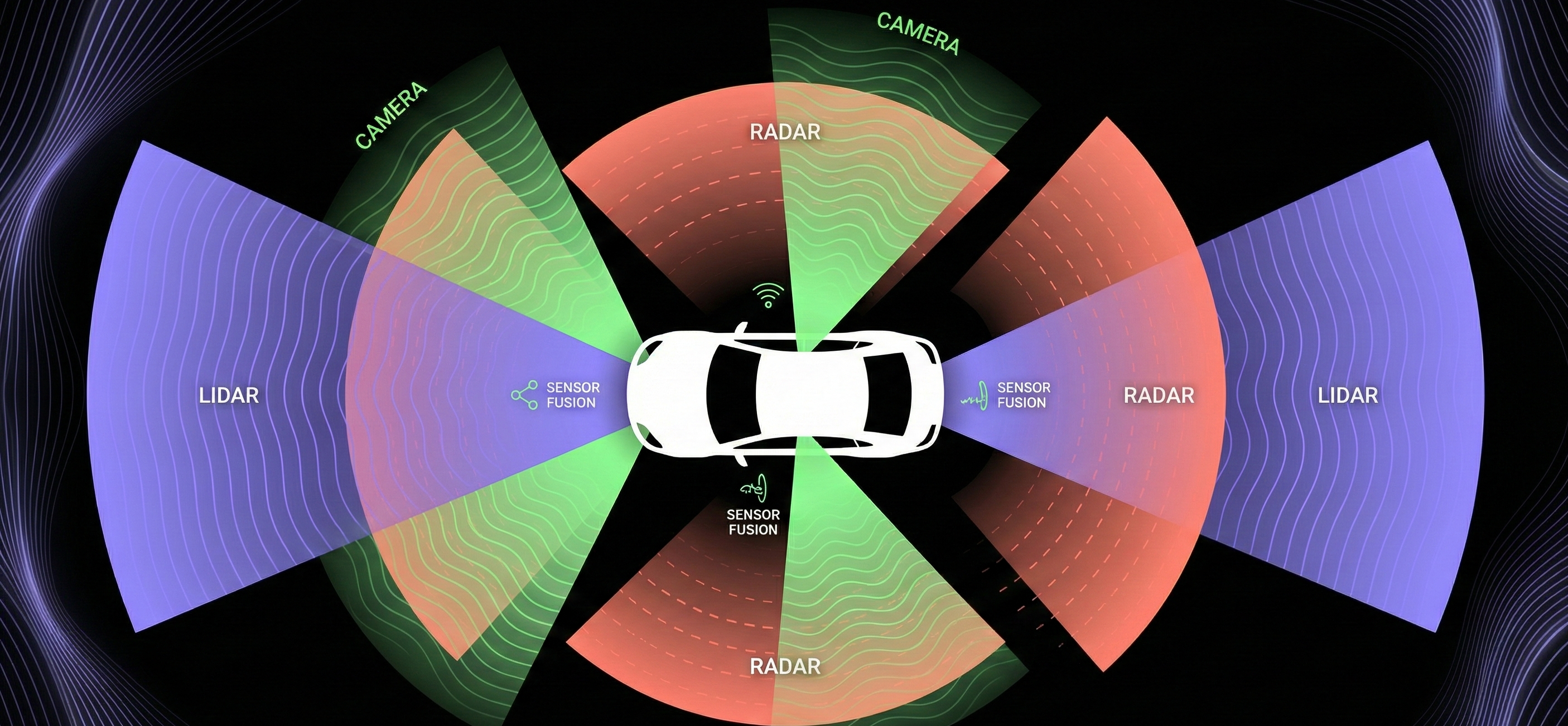
Modern autonomous vehicles don't rely on LiDAR alone. Sensor fusion combines multiple data sources:
- LiDAR provides precise 3D geometry
- Cameras provide color, texture, and visual context
- Radar provides velocity and performs well in adverse weather
For annotation, this means labeling across modalities simultaneously. An object labeled in the point cloud should correspond to the same object in camera imagery. This requires:
- Accurate calibration — sensors must be precisely aligned
- Synchronized timestamps — data from different sensors must match temporally
- Unified annotation tools — platforms that display all modalities together
The benefit: camera context helps annotators understand ambiguous point clusters, while 3D precision from LiDAR ensures accurate spatial labels.
How do you choose the right LiDAR annotation tool?
Your choice of annotation platform significantly impacts quality and efficiency. Key capabilities to evaluate:
Must-Have Features
- Native 3D editing — tools built for point clouds, not adapted from 2D
- Multi-sensor support — display LiDAR, camera, and radar together
- Interpolation — automatically propagate labels across frames
- Keyboard shortcuts — annotation speed depends on efficient interfaces
Quality Features
- Built-in validation — automated checkers that catch errors in real-time
- Review workflows — support for multi-stage QA processes
- Annotation metrics — visibility into annotator performance
Scale Features
- API access — programmatic data submission and retrieval
- Pre-annotation import — ability to refine model predictions
- Workforce management — tools for distributed annotation teams
How should you build a LiDAR annotation pipeline?
Option 1: In-House Team
Build internal annotation capability with dedicated staff.
-
Pros: Deep domain knowledge, tight feedback loops, IP control
-
Cons: Hiring/training overhead, tooling costs, scaling challenges
Option 2: Annotation Service Provider
Outsource to specialized companies with trained workforces.
-
Pros: Scalable, experienced annotators, established QA
-
Cons: Less domain-specific knowledge, communication overhead
Option 3: Hybrid Approach
Use external annotators for volume while keeping expert review in-house.
-
Pros: Balances scale with quality control
-
Cons: Requires coordination across teams
Whichever approach you choose, invest in clear guidelines, robust QA, and tooling that makes annotators efficient.
Conclusion
LiDAR annotation is foundational to autonomous vehicle development. The quality of your training data directly impacts your model's ability to perceive the world safely and accurately.
Key takeaways:
- Understand your data — point cloud characteristics like density variation and sparsity shape your annotation approach
- Choose the right annotation types — 3D bounding boxes, semantic segmentation, or both, depending on your model's needs
- Invest in quality control — multi-stage QA with automated validation catches errors before they reach your model
- Use appropriate tooling — purpose-built 3D annotation platforms dramatically outperform adapted 2D tools
- Consider sensor fusion — combining LiDAR with camera data improves both annotation efficiency and accuracy
The teams that get annotation right build models that perform in the real world. The teams that cut corners build models that fail when it matters most.
Ready to improve your LiDAR annotation workflow? Explore Kognic's platform or request a demo.
Best LiDAR Annotation Tools for Autonomous Driving (2026)
The right LiDAR annotation tool depends on your sensor configuration, team structure, and quality requirements. Here's how the main options compare.
Kognic
Kognic's platform was built specifically for multi-sensor autonomous driving data, with LiDAR annotation as a core capability from day one. It handles sensor fusion annotation natively: 3D cuboids drawn in the point cloud automatically project onto synchronized camera images using calibration data, and track IDs stay consistent across all sensor modalities and time steps.
Key capabilities: 3D point cloud annotation, multi-LiDAR support, semantic segmentation, radar integration, automated pre-labeling, 90+ quality checkers built for AV data. Annotation services (4,000+ trained AV specialists) available alongside the software. Production-proven at OEMs including Qualcomm, Continental, and Zenseact.
Best for: Teams that need production-quality multi-sensor annotation with AV domain expertise, high-volume throughput, and end-to-end quality assurance.
Encord
Encord's "Physical AI Suite" includes LiDAR annotation with SAM2-based auto-annotation and camera-LiDAR fusion support. Curation capabilities are strong. The LiDAR tooling was added recently as part of their broader Physical AI positioning: it hasn't been in production at AV customers for as long as Kognic's, and the platform is software-only (no annotation services).
Best for: Teams primarily working on general computer vision who also need LiDAR annotation capabilities.
Segments.ai (Uber AI Solutions)
Segments.ai built specialized 3D annotation tooling before being acquired by Uber in 2025. The tools are strong for point cloud work. Under Uber's ownership, its positioning as a standalone offering for external customers is still evolving.
Best for: Watch this space. Product direction under Uber ownership is not yet clear.
Scale AI
Scale AI handles high-volume annotation including LiDAR, but its primary strength and market position is in text/LLM annotation (RLHF). Its AFM-1 foundation model is 2D-only. For AV teams with complex 3D/multi-sensor requirements, Scale is primarily a volume play for well-defined tasks rather than a tool for complex multi-modal annotation.
Best for: High-volume annotation of well-defined 2D object detection tasks.
Open-Source Options (CVAT, Label Studio)
CVAT and Label Studio support basic LiDAR annotation and are free to use. They lack automated quality checking, calibration-based sensor fusion projection, and the pre-labeling capabilities needed for production-scale annotation. Common starting points for early-stage teams; rarely sufficient at production volumes.
Best for: Early-stage teams prototyping annotation workflows before committing to a production platform.
What to Look For
When evaluating LiDAR annotation tools, the capabilities that matter most for production AV data:
- Native sensor fusion: not just LiDAR, but synchronized camera+LiDAR+radar in a single view with calibration-based projection
- Sequence support: multi-frame annotation with track management, not just single-frame labeling
- Automated pre-labeling: upload your model predictions as starting points to reduce annotation time
- Quality automation: checkers that run automatically on every annotation, not just manual review workflows
- AV-specific domain support: annotators and tooling tuned for autonomous driving, not general-purpose crowd workers
See the Kognic platform for a deeper look at how production multi-sensor annotation works.
LiDAR Annotation: Frequently Asked Questions
What is LiDAR annotation?
LiDAR annotation is the process of labeling objects and features within 3D point cloud data captured by LiDAR sensors. Annotators identify and classify objects—vehicles, pedestrians, cyclists, road markings—by drawing 3D bounding boxes, segmentation masks, or polylines around them. This labeled data is used to train perception models for autonomous vehicles and ADAS systems.
How does LiDAR annotation differ from camera annotation?
Camera annotation works in 2D—you draw rectangles or polygons on flat images. LiDAR annotation works in 3D space, where objects are represented as clusters of laser-reflection points rather than pixels. This means annotators must reason about depth and spatial relationships that simply don't exist in 2D images. LiDAR data is also sparser than images, especially at range, which requires different annotation techniques and quality checks.
What are the main types of LiDAR annotation?
The four primary annotation types are: 3D bounding boxes (cuboids placed around individual objects), semantic segmentation (assigning a class label to every point in the cloud), instance segmentation (distinguishing individual object instances within the same class), and polylines or polygons (used for road boundaries, lane markings, and map features). The right annotation type depends on what your model architecture expects as input.
What makes LiDAR annotation challenging?
Three main challenges drive difficulty and cost. First, point clouds are sparse at long range—a pedestrian 80 meters away may produce only a handful of points, leaving annotators to infer object boundaries from incomplete data. Second, occlusion is harder to handle in 3D than in 2D, since objects can be partially hidden from multiple angles. Third, annotating at scale requires consistent labeling across frames collected from multiple sensor setups, which demands tight quality control and tooling that understands sensor geometry.
What is 3D bounding box annotation?
3D bounding box annotation (also called cuboid annotation) places a tight-fitting box around a detected object in 3D space, defined by its position (x, y, z), dimensions (length, width, height), and orientation (yaw angle). These cuboids give perception models the precise spatial footprint of each object. Accurate cuboid annotation is the foundation of object detection and tracking pipelines in autonomous driving stacks.
How does sensor fusion annotation work?
Sensor fusion annotation combines LiDAR point cloud data with synchronized camera images, allowing annotators to use both sources simultaneously. The camera image fills in visual context—color, texture, fine details—that LiDAR lacks, while LiDAR provides accurate depth and spatial geometry that cameras can't capture reliably. Kognic's platform is built for multi-sensor fusion, supporting synchronized LiDAR and camera annotation in a single workflow to produce consistent, high-quality labels across both modalities.
How long does LiDAR annotation take?
Annotation time depends heavily on scene complexity, annotation type, and tooling. A single frame with 10–20 objects and 3D bounding box annotation typically takes an experienced annotator 5–15 minutes manually. At scale, auto-labeling and pre-labeling pipelines reduce that substantially—Kognic's platform delivers annotation up to 3x faster than manual-only workflows by using model-generated proposals that annotators review and correct rather than draw from scratch.
How do you ensure quality in LiDAR annotation?
Quality assurance in LiDAR annotation requires multiple layers: inter-annotator agreement checks, geometric validation (no overlapping cuboids, correct heading angles), frame-to-frame consistency review for tracking tasks, and expert QA on edge cases. Kognic uses a human-in-the-loop QA model where every annotation passes through structured review before delivery, with configurable quality thresholds depending on safety-criticality of the use case.
What tools are used for LiDAR annotation?
LiDAR annotation tools need to render and navigate 3D point clouds efficiently, support multi-frame sequences for tracking, and ideally integrate sensor fusion views. Kognic's annotation platform is purpose-built for autonomous driving data—it handles LiDAR, camera, and radar in a single environment, with built-in auto-labeling, quality workflows, and support for custom sensor rigs. General-purpose labeling tools designed for 2D images often lack the 3D geometry handling and sensor synchronization that production AV annotation requires.
When do you need LiDAR annotation vs. camera annotation?
Use LiDAR annotation when your model needs accurate 3D position, depth, or spatial extent of objects—this is mandatory for tasks like obstacle detection, path planning, and HD map creation. Camera annotation is sufficient when you're working with 2D classification, 2D detection, or visual recognition tasks where depth is not required. Most production autonomous driving systems use both: cameras for rich semantic detail, LiDAR for reliable 3D geometry. Annotation pipelines should match this architecture and label both modalities in a fused workflow.
What volume of LiDAR data do autonomous driving programs typically need?
Production-grade AV and ADAS programs typically require hundreds of thousands to millions of annotated frames to train and validate perception models. Early-stage development may start with tens of thousands of diverse scenes, but full safety validation—especially for long-tail edge cases—demands much larger, carefully curated datasets. The annotation volume scales with the number of sensor modalities, geographic coverage, and the granularity of labels required by the model architecture.
How much does LiDAR annotation cost per frame?
LiDAR annotation costs vary widely based on annotation type, scene complexity, and provider. Simple cuboid annotation for a sparse highway scene may cost a few dollars per frame, while dense urban scenes with full semantic segmentation cost significantly more. Using pre-labels from existing models can reduce costs by cutting manual annotation time by up to 68%.
What is the difference between LiDAR annotation and radar annotation?
LiDAR annotation works with dense 3D point clouds that capture shape and spatial detail, making it suited for precise object detection and segmentation. Radar annotation deals with sparser data that includes velocity information but less spatial resolution. Many autonomous driving systems fuse both sensor types, so annotations must be consistent across modalities.